YT Insta Stories for Premiere Pro: A Modern Storytelling Toolkit
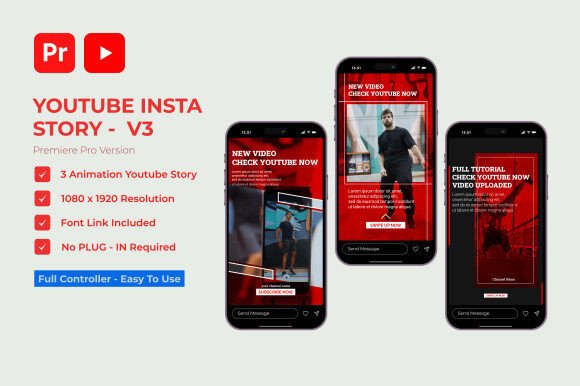
Scrolling through social media, you've likely noticed a shift. Static images are giving way to dynamic, short-form video that captures attention in seconds. For creators, this presents both an opportunity and a challenge: how to produce high-quality, engaging vertical video content consistently without getting bogged down in complex editing workflows. This is where a dedicated toolkit like YT Insta Stories for Premiere Pro becomes invaluable. It’s not just a set of templates; it's a streamlined system designed to help you tell better stories, faster, with a professional polish that stands out in a crowded feed.
More Than Templates: A System for Consistent Visual Branding
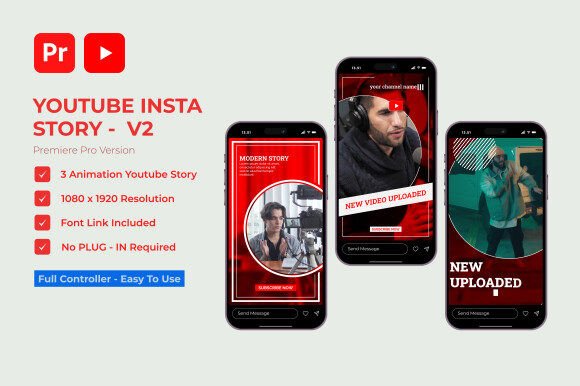
At its core, this MOGRT project provides three unique, fully customizable story sequences. The real value, however, lies in how it facilitates visual consistency—a cornerstone of strong brand identity. Imagine you're a small business owner launching a new product. You need a series of stories for the announcement, a behind-the-scenes look, and a customer testimonial. Using this toolkit, each story can share a cohesive color palette, animation style, and typographic treatment. This repetition across multiple pieces of content reinforces your brand in the viewer's mind far more effectively than a one-off video. The easy color customization means you can align every element with your brand's hex codes in minutes, ensuring your Instagram or YouTube presence is unmistakably yours.
Practical Applications for Creators and Businesses
The utility of such a flexible toolkit extends across numerous projects. For a blogger, it’s perfect for transforming a written tutorial into a quick, visual recipe or craft guide. A marketing professional can rapidly prototype and deploy campaign announcements, flash sale alerts, or event countdowns. The drag-and-drop simplicity means you spend less time on technical assembly and more time on creative strategy. Consider these real-world uses:
- Social Media Graphics: Create weekly series, Q&A sessions, or product showcases with a uniform look.
- Digital Products: Add a professional preview video for an ebook, online course, or digital download on your sales page.
- Brand Storytelling: Share your company's origin story, introduce team members, or highlight community impact in an engaging format.
- Event Promotion: Design a multi-story sequence for a webinar, workshop, or local event, building anticipation day by day.
Because it requires no additional plugins and is well-organized within Premiere Pro, it integrates seamlessly into an existing creative workflow. The included font link is a thoughtful touch, ensuring you have access to the exact typeface used in the preview, which helps maintain the designed aesthetic.
Enhancing Audience Engagement Through Design
Professional presentation directly influences audience engagement. Clunky transitions, mismatched fonts, or amateurish motion can distract from your message. The animations and layouts in YT Insta Stories are crafted to feel modern and fluid, guiding the viewer's eye naturally from one element to the next. This thoughtful design reduces cognitive load, allowing your content to land more effectively. When your visuals are polished and consistent, it builds subconscious trust and perceived value. Viewers are more likely to watch until the end, swipe up, or engage with a call to action when the experience feels curated and professional.
A Practical Guide to Using Your New Design Assets
Getting started is straightforward, but a few best practices can maximize your results. First, before customizing colors, define your brand's primary and secondary palettes. Stick to two or three core colors to avoid visual clutter. Next, think about font pairing. While the project includes a font, you can easily change it to match your existing brand fonts. A good rule of thumb is to pair a bold, attention-grabbing display font for headlines with a clean, highly readable sans serif font for body text. Always preview your stories on a mobile device before publishing; what looks balanced on a desktop monitor can feel cramped on a phone screen.
Remember, the goal is clarity. Use the templates as a foundation, but let your content—the message, the imagery, the story—be the star. The best design assets are those that support your narrative without overshadowing it. This toolkit provides the structure; you provide the unique voice and vision that connects with your audience.